If you support computer science – speak up!

Care to support a push to promote Computer Science in schools?

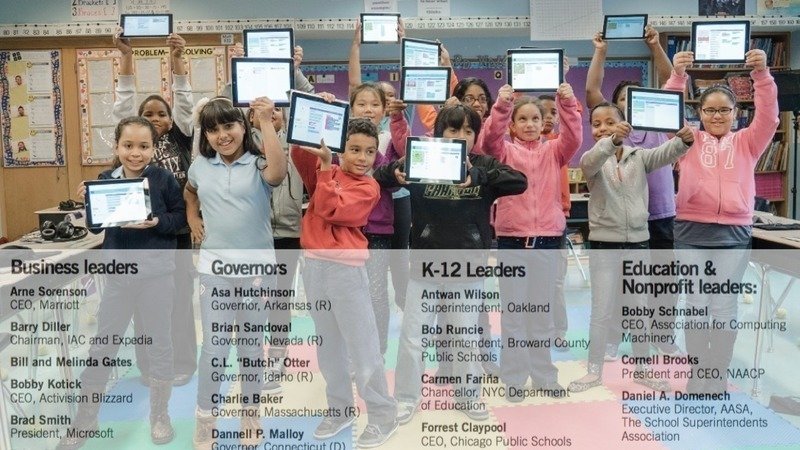
Most schools don’t have it as a foundational class, so leaders from across the US –which includes the Zuckerbergs, Cooks, Schmitdts and Gates’ of this world — have begun a movement to petition our political leaders.

You could find it here at Change.Org.

The petition was started by Code.org founder Hari Partovi., and is also supported by governors and school districts, not just the private sector. Please give it your consideration.

It’s a kite. It’s a tethered bird. Could it be a drone?

I love how this guy is disrupting the idea of what we think of a drone, to re-frame it as a kite.

A kite that takes pictures, that is.

Funny how we box ourselves in by classifying things the way they originally emerged as. Is a cell phone today really a phone? Ore more recently, with the idea of a supersized ‘commuter drone’, is a drone a light aircraft that may or may not need to be autonomous? But apart from the boxing ourselves in, the need to be creative is often stymied by those who are reluctant to make mistakes.

Sergei Lupashin, in the video below spoke at an Education technology conference last year about this. His point being we need to get young people to feel comfortable with making  a lot of mistakes! That is how we could make breakthroughs


If you haven’t seen the Chinese-made single passenger drone, here’s how they position it – learning from their mistakes. Um crashes!


Ed-Tech grows – and grows up

It might be shocking that while state education budgets shrink, Education Technology or Ed-Tech is on the upswing. Many of them are free, though the full-blown versions are quite affordable. Here are my favorites:

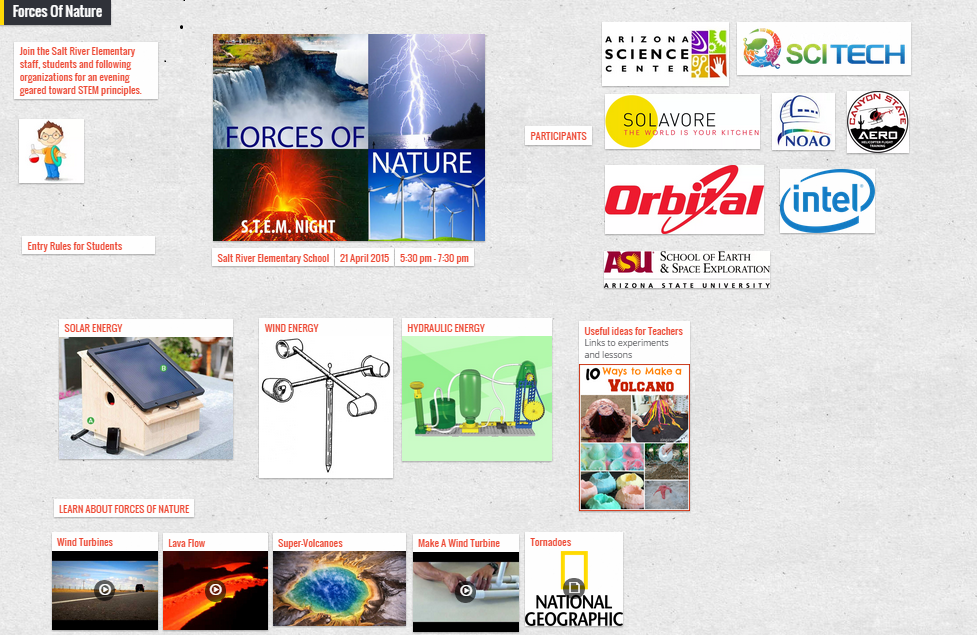
Padlet_SRE_STEM-Night2014Padlet – a collaboration and aggregation tool that feels like a website. What’s even clever isit lets you export that page as an image file, PDF, csv file; you could email it as well. I’ve written about it before here, since I use it as an events page for STEM, robotics, and even to submit a project for a class at a community college.

LinoIT – a canvas, with sticky notes that is a bit like Padlet, but acts like a bulletin board, rather than a website. Perfect for students! For added convenience, you could add a sticky note to your Lino page by emailing it to the page!

Voki – a way to create an avatar that could speak on your behalf, or tell a story!  You could set up a classroom that uses it, or use it to make an announcement! So many uses for this, especially if you want to open up a discussion about animation.

Story Jumper – a simple way to teach students what e-books are like, and more importantly what publishing involves.

PollEverywhere – I love the way it lets you create pop quizzes, to get class responses on the fly. Few schools allow mobile devices in class (mine too) but that’s easily overcome by pushing a link to all computers and have students click on answer choices.

Suddenly Ed-Tech beginning to look like the 2010 all over again, when ‘social’ was the flavor du jour.

(A bit of good news: The global Ed Tech and Smart Classrooms market is expected to grow from $43.27 Billion in 2015 to USD 93.76 Billion in 2020 –an annual growth rate of 16.7%  from 2015 to 2020.)

Hi-tech Augmented Reality goes low-tech with ‘Cardboard’

In May this year I previewed Augmented Reality glasses – the Google ‘Cardboard’ variety. So it was a pleasant surprise to see that Palmer Luckey, who came up with the clunky but amazing viewfinder called Oculus, is featured on the cover of the upcoming issue of TIME.

The plan this year is to feature Google Cardboard in a ‘STEM Talk’ in my class. As the TIME feature puts it content will be coming up soon that will enable us to learn in immersive environments. Using special or tricked out cameras that could record in panoramic view, students may soon be able to experience life on the Space Station, or that of otherwise inaccessible nomadic tribes.

Partnerships and competitors will soon bring this AR world into the mainstream. As would some GoPro hacks. I’m betting on Google cardboard, though it’s not as good as Oculus, (I could see schools more amenable to partnering with the Google folk, rather than Facebook, which now owns Oculus Rift).

It goes from this

to this


And it’s coming your way! Perhaps soon in my class!

Technology in schools. Love it or hate it?

IMG_0302

Touch screens and Robotics. My classroom this yea

In my upcoming July technology column I analyze the pros and the cons of Technology in Education. A few in my network have asked me about my thoughts on this ever-changing topic. (In Oct 2014 I did cover it – “Disrupting Education)

Here’s a summary of what’s to come. As you and I witness the discomforting transition from text books to tablets, from hand-outs to videos-as-homework, from sequential ‘lectures’ to disruptive (noisy) small group activity, it’s easy to fold our hands across our chests and fight it. But there are some compelling arguments on both sides. The Wall Street Journal, and the International Association of Technology in Education almost in the same week ran Pro and Con arguments about Ed-Tech. I get both sides! In my classes I argue against the inane use of social media for the sake of ‘publicity’, but I encourage thought use of digital media with real, and real-time audience participation.

‘Hall and Stevens’ Vs Khan Academy. In my younger days, I had to thumb through Hall and Stevens, the geometry ‘bible.’ Today’s kids are learning geometry from a guy called Salman Khan, founder the free online learning portal for mathematics and science. (Fun sidebar: ‘Hall and Stevens’ is available as an eBook; flip the pages as if it was a real book, here: https://archive.org/details/schoolgeometry00hall

Screen Time vs Think Time. I am a big proponent of virtual and augmented reality, especially if it could bring in ‘distant’ experiences (Civil War, 3D models of engineering, space science etc), but I also aggressively advocate limited screen time. Odd isn’t it? That’s the dilemma we educators and parents face. Augmented Reality

Your son or daughter probably goes to school with a device in her backpack with more processing power than the rocket that took men to the moon, and this child wants to be… an astronaut? You’ve forgotten how to log into your son’s school website to download his missed homework, but… he’s found a way to ‘jailbreak’ your cell phone? There are ‘teaching moments’ in all of these.

Sal Khan speaks of the “fundamentally dehumanizing experience” in education. And he was not talking about teenagers and even pre-teens staring at their phones and not talking to one another. A real, ‘digital citizenship’ crisis, right now! He was referring to children packed in a classroom! Hmm!

Love it or hate it, technology is gate crashing our class rooms, just like ball-point pens or calculators once did. Are you ready for it?

When science works, machines break, and coffee cups burn

In teaching technology we like to say that it’s OK mess up the first time. This is counter to how we like things to run smoothly – neat transitions, good closures etc. A formula, in other words. Even when doing a demo, you probably want your audience to see the end result.

earthquake-simulatorBut I’ve realized that in many lessons – life lessons, not class lessons– the worst thing you could do is to have something perform flawlessly.

Take this ‘Earthquake ‘simulator’ we built here. The plan was to simulate tectonic plate movement that brings down buildings. This was for our STEM Night, which happened on 21st April. A rickety contraption that would shake-rattle-and-roll using a power drill. We quickly ran into a few issues. The wheel you see here was cracking.With two hours to go to the ‘earthquake challenge’ we implemented Plan D – Duct tape. Which looked messy, but it worked. In a sense, I loved that uncertainty; an opportunity to tell students that this ‘problem-solving’ stuff we go on about, is real, even for us.

The next day, FOX 10 News showed up. More issues, with the weather guy and a camera pointing at our ‘machine’.

  • Problem #1: The drill that drove the wheel, had been taken home!
  • Problem #2: Reporter Cory McClousky wanted to repeat the ‘quake’ and of course, it failed. On camera. Nice!
  • Unrelated issue. Behind the earthquake simulator was the solar oven we used the previous day. I had left my coffee cup inside while we were waiting. A solar oven, in case you haven’t heard can reach up to 250 degrees in 30 minutes. So does the plastic cap, as you can see here, which warped out of shape.

You cannot plan these things. What looks bad, actually informs the story. McClusky’s parting line about the solar oven was: “We’re burning coffee cups in here…” Indeed. You can’t touch this.
STEM Night 2nd Red Camera (12) Solar baking After

FOX 10 News | fox10phoenix.com

 Cory Goes Back to School

Messy Learning Labs. Just what our screen-obsessed kids need

If you’ve ever complained about classrooms being stuck in the industrial age, here’s a glimpse of a different kind of class. It’s Hi-Tech space with a factory-floor setting. Perfect for digital natives, huh?
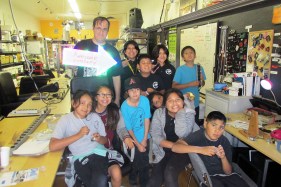
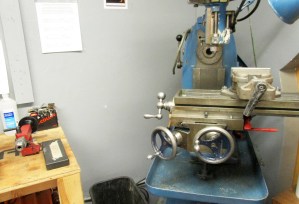
heatsynclabs_tnI took my robotics students here last Tuesday, to a place called HeatSync Labs in Mesa, Arizona. Not the kind of ‘lab’ they had in mind – but in a shocking way! It is what’s known as aMaker Space’ where kids come to ‘learn by doing’. They didn’t want to leave!

You see, a Maker Space like this is more like a mad scientist’s garage, than a classroom, with a variety of machines, tools and material just begging to be used. If you recall how HP began in a humble garage, you’ll see why a tinkerer’s tool-shed like this is what classrooms ought to be like if we are to motivate the next generation of inventors, astronomers and mad scientists like Bill Hewlett, Dave Packard. Or the next Thomas Edison (who barely went to school, please note).

Having worked with 6-12 year olds for four years now, I know how hungry they are for science. Especially science that comes to them in unexpected packages. OK, so in one corner of the lab there was a 3-D printer, an artifact from our all-too-digital present. But someone had used it to produce intriguing pieces such as this plastic cube (right), with gears!

In 75 minutes my students probably got more about science that any slick PowerPoint presentation. This was about experimenting, making mistakes, and asking ‘what-if’ questions. This was about rummaging through bins, and peering through scopes, working with laser-cut stamps they mounted on blocks of wood. And not a tablet in site!
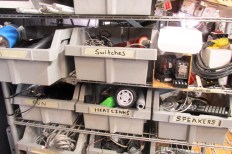
Shelves

Machine


At one point, Eric Ose who works there took me aside and told me, awkwardly, “I am not used to young people here asking permission to do things.” Meaning, this was a space that people came and just tried things out, used material lying around, and worked on their own pace. Of course there are guidelines – especially safety guidelines, as when watching laser cutting, or operating the 3-D printer.

But the real house rules are this: Try something out. Make things. Break things. Revise. Start from scratch. Discover. Build something impossible!

Note: If your students have never been to one I urge you to make it your next field trip. Many cities have these community run spaces. (Map)
HeatSync

Speaking like Jobs – Presentation tips from 10 years ago

Exactly 10 years ago this week, Steve Jobs took to the stage –a technique he would go on to perfect — to launch the iPod Shuffle.

That was Jan 11th, 2005.

I often do ‘anniversary’ events in my class, to get young people to think about where we are now, in relation to where we and the technologies we take for granted were once at. After all, this is a Computer and Technology Lab, and I don’t want to get into the trap of always featuring today’s shiny new object, or the hottest new parlor trick in digital media. We often need context, and it tends to fly by when we refresh our feeds, doesn’t it?

Back to Jobs. His presentation trick was to use insanely simple devices. Well rehearsed, and well timed but simple. Which made him very different from his tech contemporaries, who revel in Silicon Valley argot. (Yes, I listen to ‘This Week in Tech, to catch up with the other kind of tech-talk!)

Listen to how he works up the crowd, and keeps them hanging on for that characteristic”One more thing.”  Fast forward to 1:35, and see what I mean.

  • He uses words like ‘noodled’ (He “noodled on it” not “researched it”)
  • He uses unexpected pauses, and slows down and speeds up suddenly
  • He uses home-spun images – comparing the iPod Shuffle to a pack of gum, and contrasting it with four quarters

Notice how he also stays away from big words, using words like “easy”, “simple,” “thing,” etc. (And yet, peppering his presentation with keywords!)

Even if there was no YouTube, I bet we would still listen to it.

Disrupting Education. Sorry, There’s No App For That!

It’s easy to get sucked into the belief (or is it group-think?) that apps are the only way to disrupt an existing business model, or that true engagement is all about stubby fingers on a screen.

I tend to take the contrarian point of view that tablets are not the thing that will change everything. We romanticize these pieces of glass too much. Waaay too much.

I come at this from two angles. First as someone who runs a computer lab, where the touch-screens will soon over-run the grey boxes. Second hearing first-hand what very young kids barely out of diapers, can do. At the Montessori school my wife runs, pre-schoolers show leaps of knowledge, grasping complex ideas in science, geography, and math, with no tablet in sight.

Against this backdrop I took a deep dive into the Khan Academy, and even got some of my 5th grade students to follow its curriculum. Online, mind you. The opinion I came away with is neither black nor white. It’s not about the screens. It’s not about the technology. It’s a lot more simple –and subtle–than that.

If you have fallen in love with tablets, you may skip this link below:-)


If you want to read about it, it’s in this month’s LMD Magazine, for which I write a monthly technology/business column.

“Disrupting Education. Why Schools Love It.”

Digital Learning Gets To Schools, One Principal at a Time

I watched a recording of a Webinar by Eric Sheninger, a principal of a New Jersey school, who happens to be a big advocate of digital technologies in education. Been following his blog for about a year now.

His big point on Digital Leadership (speaking for, and to school administrators) was that schools should mirror or parallel the real world.  In other words, few are actually doing that. (A point backed by Univ. of Texas professor Steve Minz, who says there has been much ‘floundering and flailing’  after they emerge from college.)

I’m very cognizant of this kind of thinking, because we in elementary schools feed that college pipeline.  I start my year by informing  my students that the ‘computers’ they will use in less than a decade, won’t even look like the ugly black boxes they see in my computer and tech lab. (Not to mention the posibility that they would not simply shrink, but become invisible, yet ubiquitous.)

Sheninger has a list of seven pillars in this new model of digital leadership he offers:

1. Communications
2. Public Relations
3. Branding
4. Professional Growth
5. Student Engagement and Learning
6. Learning Environments and Spaces
7. Opportunity

Imgine that: principals and administrators having to deal with branding, in addition to student engagement. He makes some fascinating observations about our fear of technology. Interestingly, although he is a prolific blogger, he was at one time skeptical about social media!

My kinda guy!