Salt River Elementary students have a blast using 3D modeling, and getting to hear from TimeFire what it takes to be an illustrate and work in VR.
Education
So you think you can’t draw?
Who says Microsoft Word is just for typing?
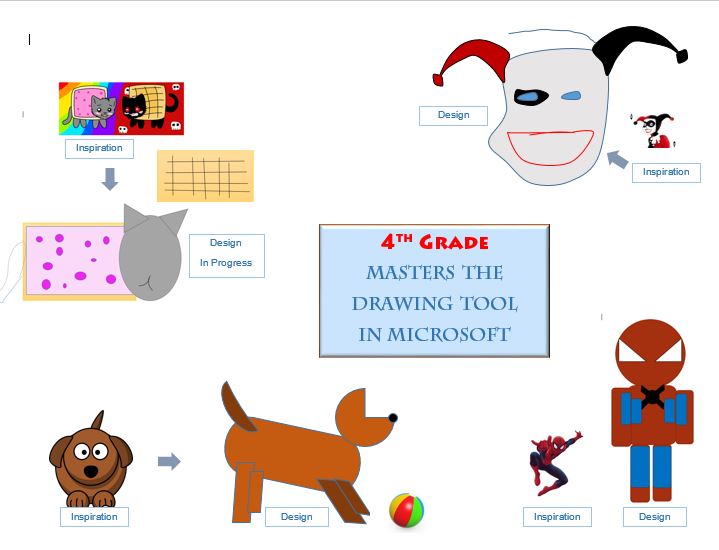
 Here’s how my 4th graders have been discovering their inner artist, using the hidden drawing tools. (The illustration on left was by a 3rd grader.)
They start off assuming they cannot draw. But once they have mastered the tool, ideas start to flow, as you will see below in the video.
Selfies gone wild!
 If you think selfies are getting out of hand, consider what humans have been encouraging animals to do with cameras. And as for the poor monkeys that clicked the shutter, not realizing it was a set up, they got sued! I kid you not!
I feature this in my March column in LMD.
On a more serious note, the Serengeti project had researchers set up 225 cameras throughout the park in Tanzania. It’s part of the Snapshot Serengeti,
Microsoft Drawing Tools – Part 2
Just had to share this. 4th graders using nothing but the tools in Microsoft Word. Are they ready for Adobe? See some previous work, here.
In my class I make sure they feel comfortable making mistakes, and starting all over again. It’s always inspiring to see a child who professes he/she cannot draw, use color and symmetry
Yes, we can be tracked! What students learned at Digital Learning Month kickoff event
Thank you, Fred von Graf for conducting a highly interactive session for our 5th grade students last afternoon. It was the kickoff to our Digital Learning Month in February.
 To a packed room of students and teachers, Fred asked them what social media platforms they use, and provided some cautionary stories of how to protect themselves from hackers, trolls and anyone with rudimentary search skills. He spoke of the dangerous side of oversharing, using same gamer handles and aliases across multiple platforms.
What I liked most about Fred’s presentation was that he avoided the geeky terms (no mention of Phishing or spoofing or doxxing), while explaining quite simply, how someone could find out sensitive and private information about you.
“Some people think of social media as a popularity contest,” said one student, commenting on a case of a someone grabbing information off people and posting it to his YouTube channel. Some spoke about how tagging children could reveal too much information about the family. Teachers shared their safe practices, such as not providing the location of when a picture was taken, or doing it after one leaves the location.
Overall, the room was brimming with insightful thoughts and suggestions, sparked by Fred’s topic, and style of presentation. He summed up, by bringing up oversharing, about seeking ‘Likes’ and the ‘addiction’ that could results from these self-gratifying practices. “You want that attention, and it becomes so easy to say ‘my privacy isn’t that important, let me put this out there’ ,” he said.
Adding new layers to Digital Learning Day 2017
Once again I’m planning some activities around the upcoming Digital Learning Day.
 Having participated since 2013, the plan is to add more than just lessons and best practices.
I’ve invited some tech practitioners, and we may even consider a community event that addresses topics that parents lose sleep over: over sharing, cyber-bullying, and the correlation between screens and grades.
Plus, I am considering an essay competition on a social media topic, and getting some students to create their own podcasts.
Digital Learning Day is on Feb. 23rd.
Here is what we did for 2016 Digital Learning Day
Do we have space for Makerspaces and tech shops?
Some days I wish I could convert part of my computer lab into a Makerspace. After all I have re-defined it as a Computer and Technology Lab, so it would be appropriate to have other technologies. Like a metal cutter, or workbench to build things – such as making a speaker out of an Altoid tin, or rudimentary printing such as silk-screening.
 I thought of this again after getting into a discussion with a teacher visiting our school from New Zealand this week. She spoke of how curriculum there includes woodwork, needlework and many hands-on activities.
She was not been aware of Makerspaces, but mentioned a parallel well-organized movement called Mens’ Sheds – run by retired people so that anyone could take up a new skill.
Makerspaces here are great places for students with rudimentary engineering products in mind, for say a science fair. They are open to anyone and are often free. Some school libraries are carving out makerspaces for 3-D printing.
I’ve visited one in Mesa, Arizona called HeatSync Labs. Love the name!
I’ve still to visit the TechShop in Chandler where you could learn CAD drawing, or how to build a (guess what?) Bluetooth speaker!
Robotics team researches Dakota Access Pipeline for FLL project
When our robotics team picked the controversial Dakota Access Pipeline (‘DAPL’) for their research this year, they never imagined a solution to the standoff would come days before they presented it.
It did.
Yet the insight they bring is even more powerful. But how does an oil pipeline relate to this year’s theme, Animal Allies?

Click to Enlarge
A quick thumbnail: The controversy began over a 1,170-mile underground oil pipeline crossing 4 states (N. Dakota, S. Dakota, Iowa and Illinois). It had been approved by the U.S. Army Corps of Engineers, but as Native American opposition gathered momentum (with activists from several tribes, including a group from the Salt River Pima-Maricopa Indian Reservation) president Obama stepped in, and the pipeline was stopped.
As for the robotics project: It is on the impact of the ‘dirty pipeline’ on animal life. They will present a case for how water and the land are sacred to the Native American people. And how it could adversely impact animal life.
The ‘problem’ may have a political solution. But their project board looks at deeper issues than that, as you could see in their brainstorming session earlier in October.

Planning for Star Wars class for ‘Hour of Code’ next week
I wish I had had the opportunity to learn JavaScript. But it’s never too late, since I can learn it while teaching some programming next week. You know, ‘He who teaches, learns twice‘ and all that!
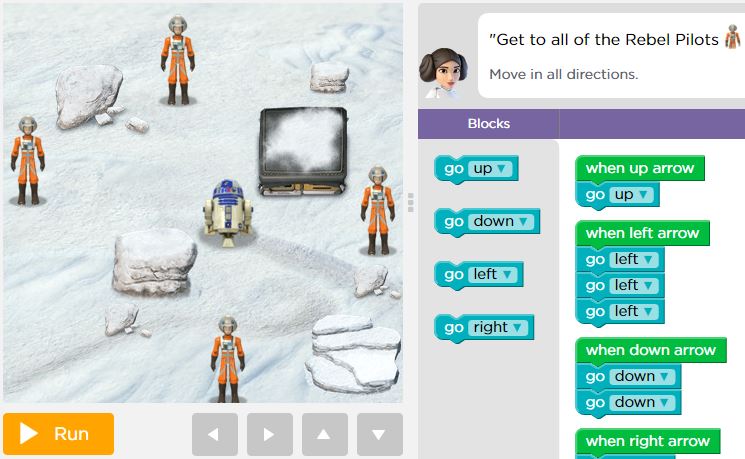
I’m doing this because it is Computer Science Education Week from Dec 5 – 11 with a focus on the ‘Hour of Code‘. (It is also the week when I have to take my ‘Lab’ to the classrooms, while the computer lab is being used for NWEA evaluations.)
The ‘Hour of Code’ folk have added new tutorials featuring, Star Wars. Something my students are focusing on for an Image Manipulation class this week. It helps to have Kathleen Kennedy (seen in the video below), producer of The Force Awakens explain how programming is very much a part of movie production today.
Students will specifically learn to program a game in which BB8 must be sent on missions to recover objects and deliver messages.
In case you are interested, Hour of Code has several social media outlets, including
• Twitter https://twitter.com/codeorg
• Facebook https://www.facebook.com/Code.org
• Instagram https://instagram.com/codeorg
• Tumblr https://blog.code.org
Please don’t ‘Like’ this post – read it
Look, you are free to not read this. I’m mainly concerned about people clicking on links or forwarding them, while not reading beyond the first two sentences.
If you got this far, Thanks!
I run into issues of young people not ‘seeing’ information in front of them, because their brains have become trained bypass information on a screen and look for images and videos. They are good ‘readers’ as the data shows. They borrow a lot of books, for sure. However they seem inattentive to information, even on beautifully laid out web pages.
Does it have something to do with our newfound desire to share, reducing our appetite to absorb, and for conversations, as Emerson Csorba says. [“Online sharing and selfies erode the value of our private lives“]
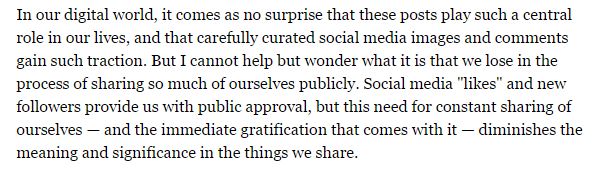
The article for the above quote is here at the New York Times article on Digital Connectedness. Worth a read.
If you got this far, I’m flattered. Thanks!
So how do students read in the digital era? Or rather, how is reading taught today to digital natives? Sadly, in many places, no differently from the pre-digital era. I read a long (warning: long!) article in Education Week, where reporter Liana Heitin says that “practitioners have few guidelines, and many are simply adapting their lessons as they see fit.” Those in literacy studies recommend that we adopt a simultaneous approach, teaching traditional and digital reading skills.
My gut feeling is we assume too much that seeing young people click on topics and pages. It makes us believe that they click, therefore the must be reading. The linear experience is being remodeled by a hyperlinked, non-linear experience even while we watch. Given the powerful desire to share instead of absorb, the non-linear experience may be not as great as advertised.
If you got THIS far, I would like to talk to you!
(There is, intentionally, no picture in this post. What made you read on?)
 Hoipolloireport
