How to teach social media, without actually calling it social media?
That’s one of the challenges I run into, now and then. To many young students –and I am talking those elementary school to whom “hash tag” means something else entirely–, there is no big distinction between media variants. Newspapers, photo albums, television, encyclopedias etc all belong to one blurry category.
You will probably hear this often – schools are really anxious about (social) media behaviors and the flood of tools that enable them. I take what might seem a contrarian approach: It’s better to prepare students for responsible use of digital media, than ask them to check them at the door.
Yesterday Feb 5th was Digital Learning Day, so it was a good day, as any to address some of these topics. Since this week also happens to be the opening week of the Olympics, I tried to pull these two strands together. As always there was a lucky collusion of opportunities.
- NBC, the official media sponsor has a micro-site dedicated to the ‘Science of the Olympics.’
- I was also able to have the ever-gracious former winter Olympian, Sean Smith agree to speak to and take questions from my students. See next post with more details.
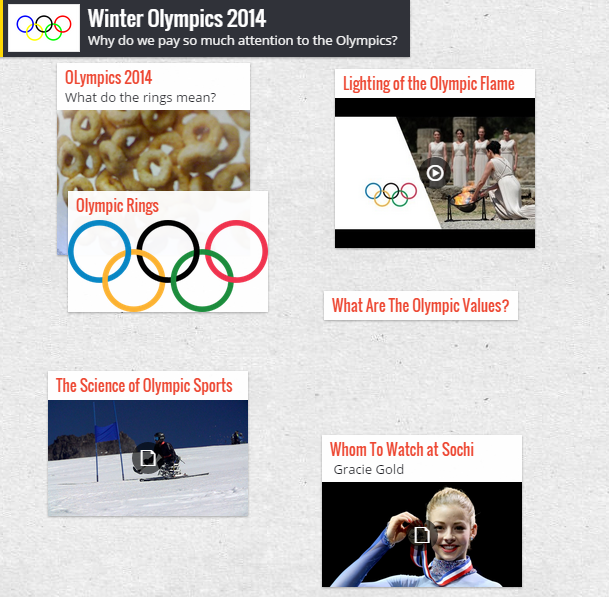
 To bring this all together in a classroom experience I began experimenting with a website another teacher referred me to: Padlet. It lets a student import content into a page in a variety of ways – from PDF to QR code, to an embed link – as you could see here. or via this QR Code it generates.
Some of these open the door to what we educators like to call Teaching Moments. To deal with topics such as:
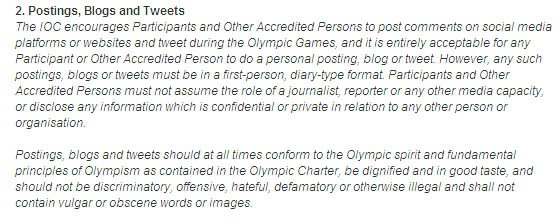
Copyright. What does that mean in a link economy, where someone could embed a video or link to something without violating intellectual property rights? Even the International Olympic committee has had to spell out its SM Policy about blogging and tweeting. Even grown ups need to abide by an event or site’s rules – such as this, below that says one cannot ‘assume’ a reporter’s persona!
Collaboration: The connectivity students take for granted (the always-on wi-fi) makes it possible to have a close conversation with a total stranger, and learn from him/her, but at the same time, sharing personal information with someone on a public channel could be dangerous.
Old media that was decidedly one-way, locked down, or expensive didn’t allow some of these opportunities, but it also protected us from the torrent of meaningless discussions, and TMI. Maybe there’s a lesson in that too.
If you’re curious about Padlet, here’s what the page looks like:
 Hoipolloireport