Permanent home for Mars Day

One of my other hats is to build content for my school website. This gives me a chance to dabble in some of the areas I used to, in my previous life 🙂

I work with our Web person, Lori Diab, who created this marvelous spot on our website. Lori just happens to be a former IABC Member, so we kinda speak the same language.

It’s a work in progress, but contains:

  • Links to past activities
  • Scientists with whom we have connected
  • Winners of competitions
  • Organizations supporting Mars Day
  • Media reports
  • Interviews – upcoming 
The idea for the page title, ‘Next Stop, Mars’ was from Lori. Which is timely, considering so much being discussed –NASA, and aerospace companies — about humankind’s next planetary home. Astronaut, Scott Kelly, who is the twin brother of astronaut Mark Kelly, is on a mission that begins in March 2015.
Kody Ensley - Tim Olson

Kody Ensley, working on Robonaut-2 at Johnson Space Center. Kody spoke to our students in Oct. 2012.

Communicating with crew on ‘Mars’ – Text-To-Speech

Those who know me, know I’m a follower of all things in space – from watching the International Space Station fly by, to the latest maneuvers of the latest Mars Rover.

So this week, it was a chance to communicate with Jocelyn Dunn,one of the 6 inhabitants of a Mars simulation mission, going on in Hawaii. The project, is called HI-SEAS (which stands for Hawaii Space Exploration Analog and Simulation).

The reason: I’m putting together Mars Day a now-annual event at my school. I thought my students would get a kick out of talking to the folks who are paving the way for humans on the red planet. Or, to put it another way, they’ve seen a lot about the bot that got there; now it’s time to communicate with Homo sapiens!

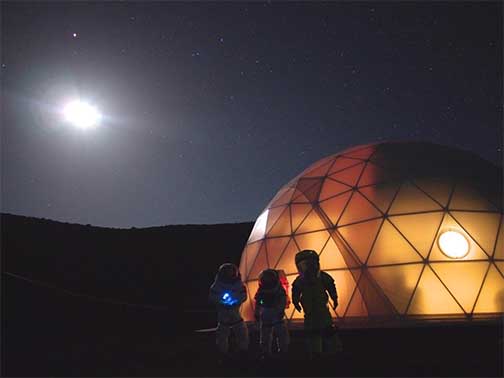
Jocelyn and the rest of the HI-SEAS crew began their ‘analog simulation’ last Friday, inside a 1000-square foot geodesic dome.(Another crew member, Zak Wilson is also blogging the stay.)

HI-SEAS Dome

Image, courtesy hi-seas.org

So what is it like to be practically isolated from the rest of the world? Isolated as in no phone calls. Now they do have access to the Internet (!) so I will be asking her these questions in a few days. Yet, to simulate the real thing, the crew’s email is subject to a 20-minute delay.

The fun part is planning for Jocelyn and her crew to answer questions from my students. After a couple of back-and-forth (time delayed) she came up with a good solution: We would send her the questions via email, and they would record their answers on a video, and send it back to us in time for Mars Day!

It will give new meaning to ‘Text-to-Speech’!

Here are links to other crew members

The “Windows in our Palms” and Digital Practice

There is no shortage of studies about the value or misuse of smart phones. It’s hard to find an adult who does not carry one. (For the record I know three people, and they are doing just fine!)

As a technology teacher in an elementary school, I must take into account the downside of too much tech, and too little ‘think time’ whether my students are involved in writing, weighing in during a discussion, or sometimes, even listening to instructions, undistracted by the screens to which we give them access.

These Digital Natives may rarely find a space that is free of technology, or an object or space urging them to turn to technology. For this reason I kicked off my classes with a unit on Digital Citizenship.

Technology is a tricky beast. Should we ban phones and roll out the cart of tablets? Should we discourage social media, but ask them to become familiar with ‘journaling’ a.k.a. blogging, one of the earliest forms of social media? Hmm!

Here are two pieces worth reading and watching:

“Why I quit Twitter” – Patton Oswalt, TIME Magazine 
Not just a discussion of Twitter, but a wonderful, commentary on how people are “peeping at windows in their palms.”

“Kids with cell phones. How young is too young?
A short video by CBS News about the pros and cons of cell phones for young children, and the need to model good practices, and teach ‘digital hygiene’.

Pixlr-O-Matic: Free tool for photo-editing

It’s been great fun this semester, stretching the minds of my students with Digital Storytelling –a topic that seems to lend itself to many aspects.

I am curating a group of these tools on Padlet –itself a space that is itself a great space for pulling together different elements of a story.

But here is one of those neat photo-editing tools that I may introduce next week – a free, online clone of Photoshop. It’s called Pixkr. I used one of the three features of tool called Pixkr-O-Matic.

NewBot_tnI took this photo, and –as you’ll see the screen shot of the editing frame– turned it into the one below, with just 4 clicks.

PixlrOmatic


Indeed, the filters have an Instagram-like look to them.

Sochi’s ‘Teaching Moments’ through social filters

How to teach social media, without actually calling it social media?

That’s one of the challenges I run into, now and then. To many young students –and I am talking those elementary school to whom “hash tag” means something else entirely–, there is no big distinction between media variants. Newspapers, photo albums, television, encyclopedias etc all belong to one blurry category.

You will probably hear this often – schools are really anxious about (social) media behaviors and the flood of tools that enable them. I take what might seem a contrarian approach: It’s better to prepare students for responsible use of digital media, than ask them to check them at the door.

Yesterday Feb 5th was Digital Learning Day, so it was a good day, as any to address some of these topics. Since this week also happens to be the opening week of the Olympics, I tried to pull these two strands together. As always there was a lucky collusion of opportunities.
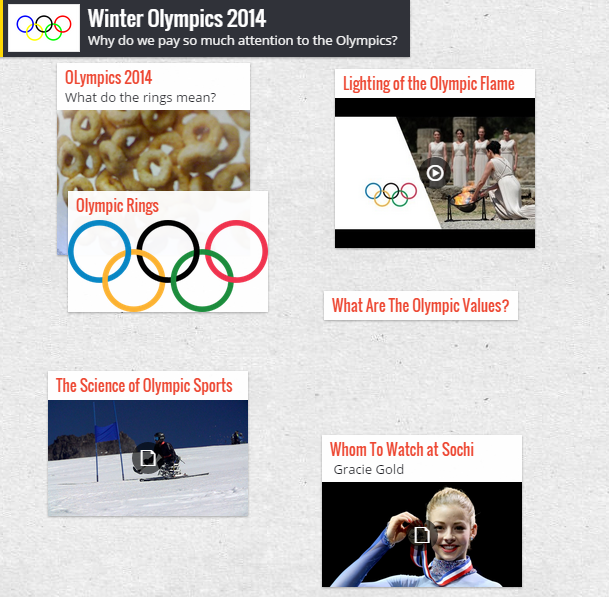
  • Padlet - OlympicsTo bring this all together in a classroom experience I began experimenting with a website another teacher referred me to: Padlet. It lets a student import content into a page in a variety of ways – from PDF to QR code, to an embed link – as you could see here. or via this QR Code it generates.

Some of these open the door to what we educators like to call Teaching Moments. To deal with topics such as:

Copyright. What does that mean in a link economy, where someone could embed a video or link to something without violating intellectual property rights? Even the International Olympic committee has had to spell out its SM Policy about blogging and tweeting. Even grown ups need to abide by an event or site’s rules – such as this, below that says one cannot ‘assume’ a reporter’s persona!
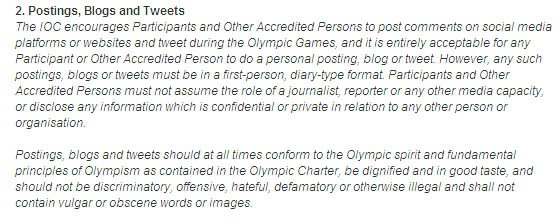
Olympic_SMPolicy

Collaboration: The connectivity students take for granted (the always-on wi-fi) makes it possible to have a close conversation with a total stranger, and learn from him/her, but at the same time, sharing personal information with someone on a public channel could be dangerous.

Old media that was decidedly one-way, locked down, or expensive didn’t allow some of these opportunities, but it also protected us from the torrent of meaningless discussions, and TMI. Maybe there’s a lesson in that too.

If you’re curious about Padlet, here’s what the page looks like:
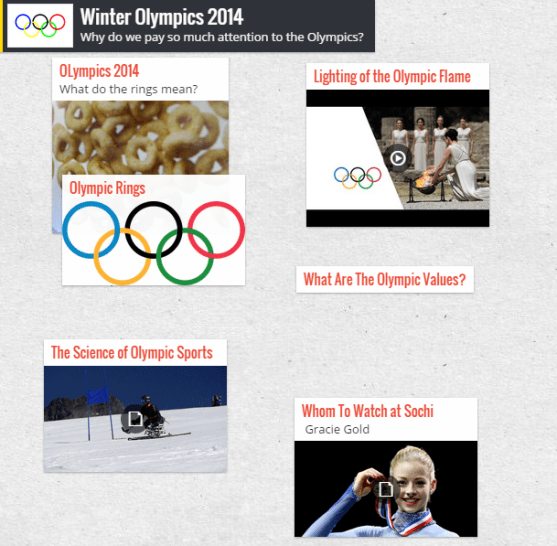
Padlet_SRE_Olympics

http://padlet.com/wall/m2iy0fn1fy.