A Lesson from the conflicting ‘birthdays’ of the World Wide Web!

Yesterday, (August 23rd) was one of the birthdays of the Web. At least it is the day when non geeks got access to the ‘global hyperlinked information system’ that Tim Berners-Lee designed.

I began using this 25th Anniversary milestone this week in classes that introduce students to how to find and discern information on the wild and woolly Web.

When I posed this question to my 4th grade students: “What is the Internet? And where could you find out about it?” one of them responded without missing a beat, “On the Internet!”

“But,” I responded, “What if the Internet was wrong about the Internet? How would you know?”

Note I said today was one of the birthdays of the Web. Oddly, while media outlets, including the likes of Huff Post, ran features, claiming Aug 23rd as the date

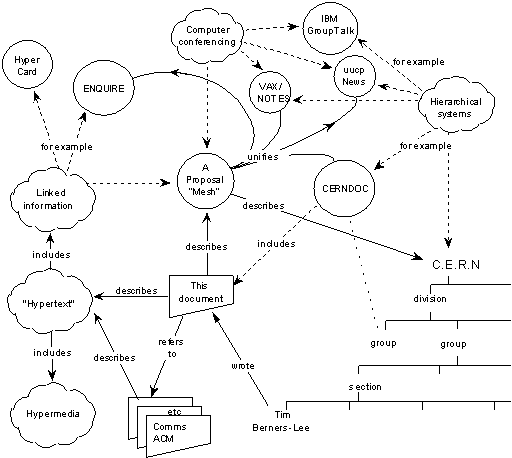
So if the real birthday August 23rd, August 6th, or March 12th? Should we go to the ‘Mesh‘ to find out? Are our trusted sources wrong? Now there’s a lesson for my students far greater than helping them ‘research’ a few factoids.

Online textbooks could be fun (or completely annoying)

You’d think I would applaud the trend to digitize textbooks. After all, I’ve winced at the sticker shock of trying to busy a book for a college level class.

But the other day my daughter explained how ‘lame’ it was to have to jump through multiple hoops online just to get to a few pages she had to read for a class. The time spent would have been better spent elsewhere, she said. I had to agree. Sometimes to make things more ‘convenient’ and deliver them in a digital skin, we hide them in confounding folders, hidden behind firewalls that even the Russians my have trouble getting to.

The goal of reading is help students discover ideas and find meaning. Not to be able to check a box on a progress report. Books made from pulp have been a ‘technology’ many want to disrupt. The Nook and the Kindle made a few inroads, but could go only so far. We humans still crave the feel of paper, the tactile experience derived from objects that convey meaning.

I just ordered a book on Amazon. Indeed I read the reviews in the digital realm, but did not buy the Kindle version. Don’t get me wrong. I love reading material on the Kindle app. Just not books anymore.

If you like to read more about The Reading Brain, there’s an excellent Scientific American article which explains how paper sometimes triggers brain circuitry in a way that screens cannot.

What’s next in Ed-Tech? Wrong question!

Buzzwords and the next big thing are hard to escape. They sidle up to us when we are not watching. I get my share of these, especially in education. (Truth be told, I could not escape it even in marketing, or advertising).

So I get asked sometimes what I see as the next big thing to hit us in teaching. It’s easy to rattle off some tools, because they are touted as some form of  ‘student engagement.’ I have this feeling that Ed-Tech is going to be as passe as Social Media. Meaning we should stop talking about it as if it was some self-contained phenomenon or enigma that needs to be deciphered.

I’m not alone in having this sentiment. I’m sure many teachers are thinking the same. Andrew Marcinek has written a sensible piece about this in Medium. He goes so far as to say (“The End of Ed-Tech”) that

It is no longer necessary to say whether you consider yourself “tech savvy” or not. Essentially, “tech savviness” should be an inherent part of an educator’s educational philosophy because it will be an essential part of every student’s future. This is to say, educators should understand how active use of technology hardware and software should be led by the learning objectives and outcomes as opposed to being front and center in any classroom.

Like it or not almost anything we don’t yet consider ‘technology’ or a ‘tool’ will become so embedded in what we do that we won’t need to have a class on how to use it. I don’t think there was ever a PD session on how to use the electric pencil sharpener, or the two-button mouse.

So the next big thing in Ed-Tech will be ‘Nothing Much.’ To look out for it, is to look ponder about the wrong question.

What’s a humanoid robot doing in a STEM class?

Intrigued by robots that look less like appliances and more like humans?  Even I sometimes get a bit creeped out.

But this little guy, NAO, changed my perspective. It is a learning tool, no different from any other bot, such as a spherical bot, a drone, or an Lego NXT brick. It’s got a friendlier interface, too.

I met the company that showcased it, RobotLAB, and this week spoke to their team members about how it can help students learn programming. It’s possible to even incorporate it into some aspects of a STEAM program.

ISTE 2016 Denver (17)I found out that some schools in the San Francisco Bay area are using this NAO to support reading and writing modules. As you might imagine, the program – a software and hardware package- is a bit pricey. But they are big on year-round support for teachers. Meaning it’s not like buying some hardware and being left to figure things out, or fix something that breaks.

Fours years ago, I spoke to someone who worked on the first humanized a robot to be sent up to the International Space Station. It was clear even then that such a humanoid  ‘device’ (which could be folded into a suitcase!) was designed to work alongside a real engineer or scientist –rather than make humans redundant.

Cooking with sunshine in Arizona

We took out the solar oven again this week, and it was amazing what a ‘black box’ could do, unsupervised.

My wife has become quite an expert – and experimenter. This was the latest. Stuffed bell peppers, with rosemary. Previously it was roast beef. Before that egg plant, and spaghetti squash…
The oven we use the Solavore Sport. It comes with two black pots that perfectly fit in the oven space even with the lids. This week, with temps hovering in the 108 degree range, it didn’t take long to get up to 250 degrees in the oven.

In May, I conducted a Chili Cook-Off at Salt River Elementary, as part of a year-end STEM project for 6th graders. May was a ‘cooler’ month (if you could call 98 degrees cool – a sarcastic Arizona joke of sorts). And yet we had chili cooking at 275 degrees within 20 minutes. 


How handwriting develops the brain in the digital age

If

If you’re interested in education, or chiming in on a controversial discussion of whether handwriting is still relevant (or ‘old fashioned’) in the age of keyboard, here’s some fodder:

Why handwriting is still essential in the digital age – by Perri Klass, MD

The key is to pay attention to “early fine-motor writing skills” even in pre-kindergarten. I’ll spare you the sciency details of this article if you are just scanning this blog. But suffice to cite this from the well documented studies that Dr Class cites:

“After the children were taught to print, patterns of brain activationin response to letters showed increased activation of that reading network.”

It may be satisfying to some that this is not an either-or discovery. There is a role for Manuscript writing, Cursive, and Keyboarding – the need for ‘hybrid writers.’

This is a topic that comes up a lot in my work as a teacher, and I will return to it shortly when I get back to work in my ‘hybrid’ computer lab.

Google Expeditions meets ViewMasters – highly overpriced

It’s pricey, but it’s here. The answer to having Google Expeditions as a Virtual Reality tool for classrooms.

It’s a long, long shot from the basic Google cardboard headset that could potentially work with a smart phone as Google once promised.

The cardboard headsets were part of the lure because they had such a hand-made feel to it. The new kits, sold by Best Buy (the kit uses a Mattel ViewMasters unit) start at $3,999 for just 10 students, making it an over-priced nice-to-have for many schools. Way beyond the budget of many schools.

Virtual field trips are great, but some of us will have to wait until the a disruptor enters the field .Stereoscopy or the ability to have perceptions of depth and mass is being put to use in many areas outside of education. Let’s just hope Google Classroom continues to give us less branded, low-cost ways to experience Google Expeditions. We have already begun looking into VR for some of our STEM sessions, as I have mentioned before.

ISTE Ed-Tech Conference Wrap-up: Part 1

Just got back from the ISTE 2016 conference in Denver, and it’s hard to decide what stood out more: The technology, or the practices.

HARDWARE: Being a tech teacher, indeed the tools were mind-blowing. From the simple Digital Storytelling hacks, and wide range ofgaming technologies, to Makerspace ideas such as conductive material, to Virtual Reality, and Robotics. (More on robotics in a later post.) VR seems to have matured since 2014, and mini robots –like the Sphero, here — were practically running over our feet. OK, I actually took the challenge and drove one of these across the floor. They’re practically unbreakable, too!

SOFTWAREThe software definitely made me do a double take, when it came to programming languages, and ‘kits’ to simplify the learning curve. It’s finally come to this: software doesn’t exist in some abstract dimension, but comes coupled with devices that a student could learn to program – and see the effects in real-time. Google and Microsoft appeared to be fighting for attention. If you had the stamina and enough coffee, you could go through an entire day toggling between a Google classroom and that of Microsoft’s. Both have well defined Education divisions. (The former made 5 education product announcements at the conference.)

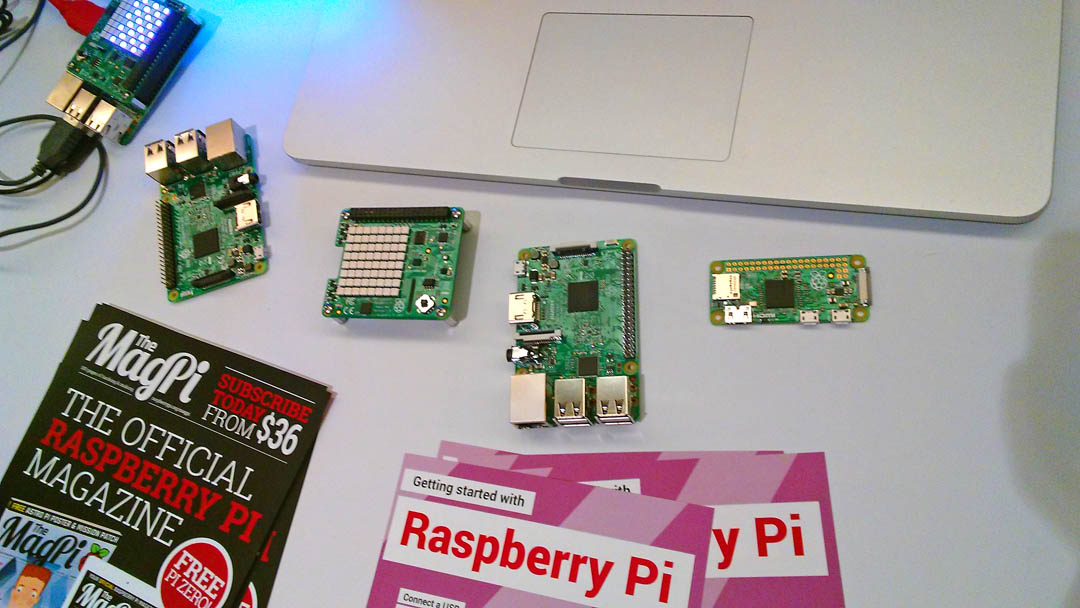
The sessions I liked most, were the Education Playgrounds. These were informal on-on-one or group sessions. I picked several that combined hardware and software. I met with a few Raspberry pi experts, basically teachers who worked with kits that were built around this mini computer.

I was fascinated by the no-frills entry-level kits (starting at the princely sum of $35 an unit!). Why?

RaspberryPi-tn

First because this hardware was not housed in some beautiful laminated case but was transparent enough or a 3rd grader to understand what a computer was all about. I often need to remind students that ‘computing’ is not some mysterious art form.

Second, computer literacy and digital literacy are joined at the hip today, in the same way that Robotics and the Maker movement can be two sides of the same coin. We need to merge our lesson plans, and get our young Digital Citizens to be Makers, engineers, designers, tinkerers, problem solvers and storytellers to recognize they can each take a piece of this action, and run with it.

FINALLY: I attended a few mind-expanding poster sessions, where the presenters were students. I’ve said it before that no teacher conference would be complete until you have met with students who are after all the reason our schools go to great lengths to send us out to these professional development events. It’s inspiring to see the end product of great teaching, and how underpaid teachers in bootstrapped school districts get students to soar. Many takeaways from these sessions.
VoiceThread meets Ted Talks!

I wish I had heard of this earlier – Voicethread‘s answer to TedTalks. Just in time for the ISTE Conference starting Sunday.

https://voicethread.com/app/player/?threadId=7784579

It’s called ThreadTalk. Which is quite a neat play on TedTalk considering how VoiceThread is all about the Thread, more than the voice. They make the point that the quality of the conversation thread is just as important as the presentation.

In other words, it’s not about the fancy slides, but the content.

As the VoiceThread notes, we tend to stop using our voices and replace it with text communication because the Internet was not quote supportive of voice for a long time. It is now, as we know thanks to services such as Google Voice, Viber and other phone apps. But in education, we need to bring back the spoken word and student voices into the mix.

I’m waiting to see what evolves out of ThreadTalk, post ISTE2016.