Screens come under scrutiny – again!

I knew we’d be talking about this sooner or later: Do touch screens reduce how much we absorb, while paradoxically increasing ‘engagement’? Or, are the dumb things that happen in Real Life better teachers than VR, or smart screens?

Researchers have been warning us –from pre-Internet days–  that excessive screen time was having negative effects on children’s attention, learning (cognitive skills, language development), and sleep.

A screen is a two-dimensional (2D) experience that is hard to resist, across all age groups. Yet, a recent report tells us that screens “do not inherently provide (children under 3 with) rich opportunities for whole mind-body learning.”

For instance, it says:


“Researchers who study how children learn have concluded, however, that it is easier for young children to comprehend information from real-life experiences with people and objects compared with information delivered via a screen.”  (“Screen Sense. Setting The Record Straight”)

No one is asking us to eliminate screen-time. But we could rethink how creative thinking, problem solving and experimentation could work without pixels.

Communicating with crew on ‘Mars’ – Text-To-Speech

Those who know me, know I’m a follower of all things in space – from watching the International Space Station fly by, to the latest maneuvers of the latest Mars Rover.

So this week, it was a chance to communicate with Jocelyn Dunn,one of the 6 inhabitants of a Mars simulation mission, going on in Hawaii. The project, is called HI-SEAS (which stands for Hawaii Space Exploration Analog and Simulation).

The reason: I’m putting together Mars Day a now-annual event at my school. I thought my students would get a kick out of talking to the folks who are paving the way for humans on the red planet. Or, to put it another way, they’ve seen a lot about the bot that got there; now it’s time to communicate with Homo sapiens!

Jocelyn and the rest of the HI-SEAS crew began their ‘analog simulation’ last Friday, inside a 1000-square foot geodesic dome.(Another crew member, Zak Wilson is also blogging the stay.)

HI-SEAS Dome

Image, courtesy hi-seas.org

So what is it like to be practically isolated from the rest of the world? Isolated as in no phone calls. Now they do have access to the Internet (!) so I will be asking her these questions in a few days. Yet, to simulate the real thing, the crew’s email is subject to a 20-minute delay.

The fun part is planning for Jocelyn and her crew to answer questions from my students. After a couple of back-and-forth (time delayed) she came up with a good solution: We would send her the questions via email, and they would record their answers on a video, and send it back to us in time for Mars Day!

It will give new meaning to ‘Text-to-Speech’!

Here are links to other crew members

Hyperventilating about tablets in the classroom

You’ve probably read plenty of stories how tablets are shifting the tectonic plates in teaching. And ‘personalized learning.’

I hang around many all-things-digital folk, making rallying for ‘tablets in the classroom! tablets in the classroom!” I also talk to those anxious as desktops give way to touch screens in the class. My daughter’s class now does a math class on Dell tablets. My school has two touch-screen computer hubs.

And though I run a (tablet-free, for now) computer lab, I was a tad irritated by a statement by a fellow computer lab instructor quoted in a TIME article as saying “We don’t care about handwriting.” This was in response to a parent’s concern about screens in a classroom in California.

Not sure who the royal plural ‘we’ referred to, but Matthew Gudenis certainly doesn’t speak for me, or my school’s position. (Read The Paperless Classroom is Coming” in TIME this week.)

Gudenis should’ve read this wonderful piece by Susan Vechon, “Why Learning To Write by Hand Matters,” (in Education Week) who admits she stumbled on the connection between handwriting and the higher-level thinking after many years of teaching.

I’m not dissing tablets, per se. I would be the first to admit that classrooms need to use more of the technologies that young people encounter once they clamber back on the bus after school. But that does not mean dismissing the value of books and pencils, notebooks and research. If we are not careful how we present them, the tabletized learning environment could unwittingly turn students into consumers of knowledge, not producers of ideas and opinions. Touch screens can turn readers into content snackers. We need to create spaces where students could do some thinking and talking, apart from clicking and scrolling.

Twelve to fifteen years from now, these will be our human resources, our intellectual capital. They will be the ones generating your reports, formulating cogent arguments that impact communities, writing persuasive letters, covering the local news.

To say we don’t care about handwriting because kids today know to type, is like saying we don’t need to care about spelling and grammar, because we have auto-correct and spell-check. So let’s stop hyperventilating about tablets, and get excited about what we can do with them.


Update: Just came across this Discussion of Screen Time


Disrupting Education. Sorry, There’s No App For That!

It’s easy to get sucked into the belief (or is it group-think?) that apps are the only way to disrupt an existing business model, or that true engagement is all about stubby fingers on a screen.

I tend to take the contrarian point of view that tablets are not the thing that will change everything. We romanticize these pieces of glass too much. Waaay too much.

I come at this from two angles. First as someone who runs a computer lab, where the touch-screens will soon over-run the grey boxes. Second hearing first-hand what very young kids barely out of diapers, can do. At the Montessori school my wife runs, pre-schoolers show leaps of knowledge, grasping complex ideas in science, geography, and math, with no tablet in sight.

Against this backdrop I took a deep dive into the Khan Academy, and even got some of my 5th grade students to follow its curriculum. Online, mind you. The opinion I came away with is neither black nor white. It’s not about the screens. It’s not about the technology. It’s a lot more simple –and subtle–than that.

If you have fallen in love with tablets, you may skip this link below:-)


If you want to read about it, it’s in this month’s LMD Magazine, for which I write a monthly technology/business column.

“Disrupting Education. Why Schools Love It.”

The “Windows in our Palms” and Digital Practice

There is no shortage of studies about the value or misuse of smart phones. It’s hard to find an adult who does not carry one. (For the record I know three people, and they are doing just fine!)

As a technology teacher in an elementary school, I must take into account the downside of too much tech, and too little ‘think time’ whether my students are involved in writing, weighing in during a discussion, or sometimes, even listening to instructions, undistracted by the screens to which we give them access.

These Digital Natives may rarely find a space that is free of technology, or an object or space urging them to turn to technology. For this reason I kicked off my classes with a unit on Digital Citizenship.

Technology is a tricky beast. Should we ban phones and roll out the cart of tablets? Should we discourage social media, but ask them to become familiar with ‘journaling’ a.k.a. blogging, one of the earliest forms of social media? Hmm!

Here are two pieces worth reading and watching:

“Why I quit Twitter” – Patton Oswalt, TIME Magazine 
Not just a discussion of Twitter, but a wonderful, commentary on how people are “peeping at windows in their palms.”

“Kids with cell phones. How young is too young?
A short video by CBS News about the pros and cons of cell phones for young children, and the need to model good practices, and teach ‘digital hygiene’.

Digital Learning Gets To Schools, One Principal at a Time

I watched a recording of a Webinar by Eric Sheninger, a principal of a New Jersey school, who happens to be a big advocate of digital technologies in education. Been following his blog for about a year now.

His big point on Digital Leadership (speaking for, and to school administrators) was that schools should mirror or parallel the real world.  In other words, few are actually doing that. (A point backed by Univ. of Texas professor Steve Minz, who says there has been much ‘floundering and flailing’  after they emerge from college.)

I’m very cognizant of this kind of thinking, because we in elementary schools feed that college pipeline.  I start my year by informing  my students that the ‘computers’ they will use in less than a decade, won’t even look like the ugly black boxes they see in my computer and tech lab. (Not to mention the posibility that they would not simply shrink, but become invisible, yet ubiquitous.)

Sheninger has a list of seven pillars in this new model of digital leadership he offers:

1. Communications
2. Public Relations
3. Branding
4. Professional Growth
5. Student Engagement and Learning
6. Learning Environments and Spaces
7. Opportunity

Imgine that: principals and administrators having to deal with branding, in addition to student engagement. He makes some fascinating observations about our fear of technology. Interestingly, although he is a prolific blogger, he was at one time skeptical about social media!

My kinda guy!

Drone, Baby Drone and other Creative Apps at ISTE 2014

“Creative teachers,” said one presenter –whose name I couldn’t jot down because I didn’t have the appropriate app ready to scan his QR code at a 30-foot distance–“know how to sneak the really good stuff into their classroom.”

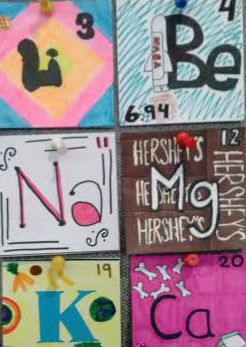
elementsAs this marathon ISTE conference draws to a close, there were so many sidebars, and concurrent darn-I gotta-skip events, it’s hard to pin-point one big thing. I ran into more creatives (the tablet-wielding types) per square foot than at any event I’ve attended. Students, too. More about that in a moment. And I don’t mean creative types in terms of the iPad-toting app-happy folk. There are teachers who have spent insane number of hours disrupting their lesson plans with science-ish, media-ish, technology-ish, math-ish hands-on work that you’d think they were running non-profit enterprises. (sidenote: I just recalled the afore-mentioned speaker – author of the children’s book, “ish” – Peter Reynolds.) Getting students to produce hand-drawn periodic tables because they work better with Augmented Reality. You get the idea.

This enormous body of work ought to be documented (Ok, Evernoted, Dropboxed, Google docked or Wikiid) for the 18,000 weary souls who will drag themselves to the train station and airport today. So that when we return to our students in August, we could pull up some of these big ideas to implement.

Consider some of the discussions and hands-on sessions. Most people outside of education (that’s where I came from) only hear of Arduino, Aurasma, SkitchReflector, and Qrafter at social media shin digs. Drone Baby droneThe rush (crush) to scan QR codes was so great at one point this morning there were lines of people –smart-phones poised– that rivaled Starbucks. I must’ve been the only tech blogger with an analog device –my notebook.

Most people think Maker Spaces are where wanna-be engineers mess around. One teacher at a small booth tucked away in a corner had practically designed a pinball machine kit for students to experiment with simple machines. No fancy app here, but ‘moving parts’ foraged from Home Depot and her garage: door knobs, furniture screws, bolts, rubber bands and ‘springs’ from spines of spiral-bound notebooks. Creative teachers really know how to sneak in the good stuff, on a budget.

In case you read my post yesterday, yes, this kind of creative pedagogical streak is very different from the cameras, cloud-based tools and Google-glas-ish shiny objects I ran into before.

THEN THERE WERE STUDENTS teaching the grown-ups. Lots of them. One group from Mexico brought a mine-rescue bot controlled by Bluetooth, a piezo-electric floor, a cardboard-model levitation train, and a swimming robot embedded in a large plastic bottle that can take water-samples of a polluted lake. Students! Others were showing off how to turn 2D images into 3D movies –ideal for digital time capsules. That palm-sized quadro-copter (above) is not however a student project, but a company who has STEM-ready drones that I just might use, soon.

One more day to go. I plan to skip the last keynote and go talk to more smart people…

And apps to download before I sleep. And apps to download before I sleep.

Ed Tech surge as educators prep for Common Core and more Science

ISTE_crowd1It’s hard to miss the optimism at the premier Education Technology conference here in Atlanta. Think of ISTE as the SXSW for teachers.

Supposedly attended by 18,000 people, it’s a bit like Disney Land, in some respects, with lines stretching hundreds deep. But the technology on show is extremely good, give and take a few shiny new objects.

For instance:

  • I ran into someone from the University of Penn, who’s got a content curation service that uses natural language processing (or nlp) which uses some kind of artificial intelligence and smart filters that a teacher can adjust to grade level. It made complete sense to someone who gets annoyed to hear ‘search’ referred to as ‘Research’. Google isn’t optimized for education, she said. Google is optimized for advertising and monetization. Duh!

PupppetVid_2b

  • There’s a tech coordinator and science instructor out of Colorado, Kristin Donely, who’s found a neat way to let students produce animated videos using a super-cheap green-screen technique.
  • I met someone using, and sat in a class on Augmented Reality (this app Aurasma is amazing) about bringing science to life.
  • I bumped into a team from New Zealand who has a way to let students improve their reading by a teacher adding drag-and-drop sound tracks of music, ambient sound and sound effects. They will let me try Booktrack for free; I could see a different use of it – to amp up my digital storytelling module.
  • Glass3Then there is the iPad economy – with companies developing apps, attachments, learning/tracking systems, engagement tools. The push to create 1:1 classrooms is huge. Steve Jobs must be smiling up there
  • I did see a few people trying to convince us that Google Glass is God’s greatest gift to pedagogy. This lady, Kathy Schrock told me that she believes Glass would be useful in projects that lets a teacher give new perspective to a lab in progress, and also have her hands free.
  • Speaking of Glass, this very cool camera from EXO Labs is more than a shiny new object –it could double up as a microscope for science projects and also stream images wirelessly. And of course, it works with (only) an iPad.

Coding in schools gathers steam, thanks to Microsoft, Google, Apple, Facebook et al

I began introducing coding to my 5th grade classes this year, and the interest level is truly inspiring. I was planning to up the ante in the next school year. Looks like my timing couldn’t have be better.

Many stories have begun to appear about how Coding is being pulled into the curriculum.

The latter piece (by Matt Richtel, 10, May 2014) weighs in on the pros and cons, especially wondering if there’s something iffy about having big-name backers such as Microsoft and Facebook. The insinuation is that they may have vested interests in this, and not be interested in the bigger picture of inspiring the science in computer science.

That’s being a bit too snarky. After all, the ‘career ready’ jobs that educators talk up so much are in such spaces that the present and future Gates’ and Zuckerbergs will create and nurture. I want these kids to glide into those plum jobs, ten years from now. That the runway is being paved with corporate dollars –and their sweat– is not necessary a bad thing, is it?

Also, teaching students to code is not trying to turn them into over-paid kids working out of a coffee shop. Making computer science a mainstream discipline, not a nice-to-have, is a place to start.

If you really want to know the grand plan of computer science, here is an illuminating document on Computer Science Standards for K-12 by the Computer Science Teachers Association (CSTA). Some of the points they stress:

  • CS’s role in “logical reasoning, algorithms thinking, and structural problem-solving.”
  • The value of being closely aligned with business people, scientists, artists etc.
  • Teaching students to work ‘cooperatively’ and ‘collaboratively’
  • Teaching ‘Computational thinking’ –from data representation to problem solving

Sounds a lot like Common Core to me. This is what educators in CS have thought through, calling for us to embed these skills as early as Kindergarten. This is not something that grew out of Silicon Valley.

It’s time we put it into practice. The kids are hungry for this!